Hype5 Theater 0.7.0 · Beta — by invitation
The Hype5 app (Fuajee)
Hype5 Theater is managed in the Hype5 app. Hype5 Theater in the WordPress sidebar opens it, and everything else is reached through the app's own navigation.
The Hype5 app (code name Fuajee) is the administration application of Hype5 Theater. Hype5 Theater in the WordPress sidebar opens it directly (wp-admin/admin.php?page=hype5t-app). It covers the daily work of a theatre — productions, credits, people, the schedule, venues, appearance, vocabularies and settings — and everything is reached through the app's own navigation. The WordPress lists and editors remain as compatibility screens for the tasks the app hands to WordPress.
Who can open it
Everyone with a Hype5 Theater administration permission — editing productions, people or venues, managing performances, managing the Hype5 settings, changing the Hype5 appearance (manage_options) or managing a vocabulary. These are the same people who saw the classic Hype5 Theater menu before Theater 0.7.0. There is nothing to switch on.
For these users the WordPress sidebar shows one entry, Hype5 Theater, with no submenu (unless another plugin adds its own page under it); it opens the app on the Overview. Users without such a permission — for example WordPress editors, authors and subscribers — see no Hype5 entry, and the app page and its API refuse them. A user whose only Hype5 permission is editing credits has no Hype5 screen at all: credits are edited inside a production, which needs the permission to edit productions.
Opening the app never grants a permission. Inside the app each screen and action follows the same capabilities as the classic screens (see Roles and capabilities); a user who may only change settings, for example, sees Settings and Vocabularies and is pointed to them from the Overview. The data saved in the app is ordinary plugin data that the classic screens read.
Technical fallback. define('HYPE5_THEATER_FUAJEE', false); in wp-config.php switches the app off for everyone: the classic Hype5 Theater menu and screens return (see Without the Hype5 app). Developers can also switch it off or on per user with the hype5_theater_fuajee_enabled filter; the filter cannot give anyone a permission. Until 0.6.17 the app was enabled only by that constant (true) or by a list of user IDs (the hype5t_fuajee_testers option); Theater 0.7.0 no longer reads that list and leaves the stored option unchanged.
Old addresses of classic Hype5 screens that the app replaces, such as bookmarks to Hype5 Theater → Settings, open the matching app screen (see Old addresses). On the compatibility screens, Open in Hype5 app in the WordPress toolbar and on the rows of the WordPress lists of productions, people and venues returns to the app.
Layout
- Sidebar. Work: Overview (Ülevaade), Productions (Lavastused), People (Inimesed), Schedule (Mängukava), Venues (Mängupaigad). Setup (Seadistus): Appearance (Välimus), Vocabularies (Liigitused), Settings (Seaded). A destination the user may not use in the app is shown as a link to the classic screen, or not at all.
- Search.
Ctrl+K/⌘Kopens Hype5 search on the app screen. - Back to WordPress returns to the normal wp-admin.
- The app has a light and a dark theme and follows the user's WordPress language (English and Estonian are included).
WordPress and plugin notices are shown as plain text in the app's own notice area.
Saving and editing together
- Changes are kept as a draft until you press Save. Leaving with unsaved changes asks first.
- Productions, people and venues use WordPress's own edit lock: while someone else edits a record (in the app or the classic editor), it is read-only with their name and a Take over option.
- If a field was changed elsewhere after you opened the record, the save stops and the field is marked; you choose Use saved value or Keep mine. Your other changes are kept.
- If only part of a save succeeds, the app names what was saved and keeps the rest as unsaved changes.
Overview
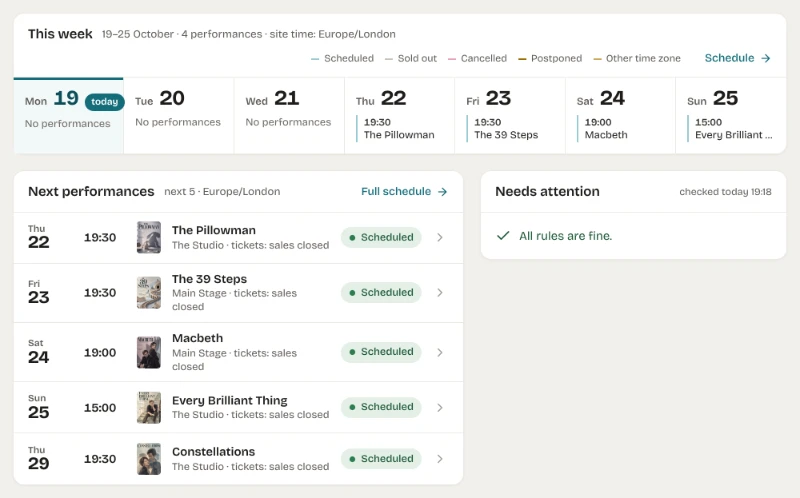
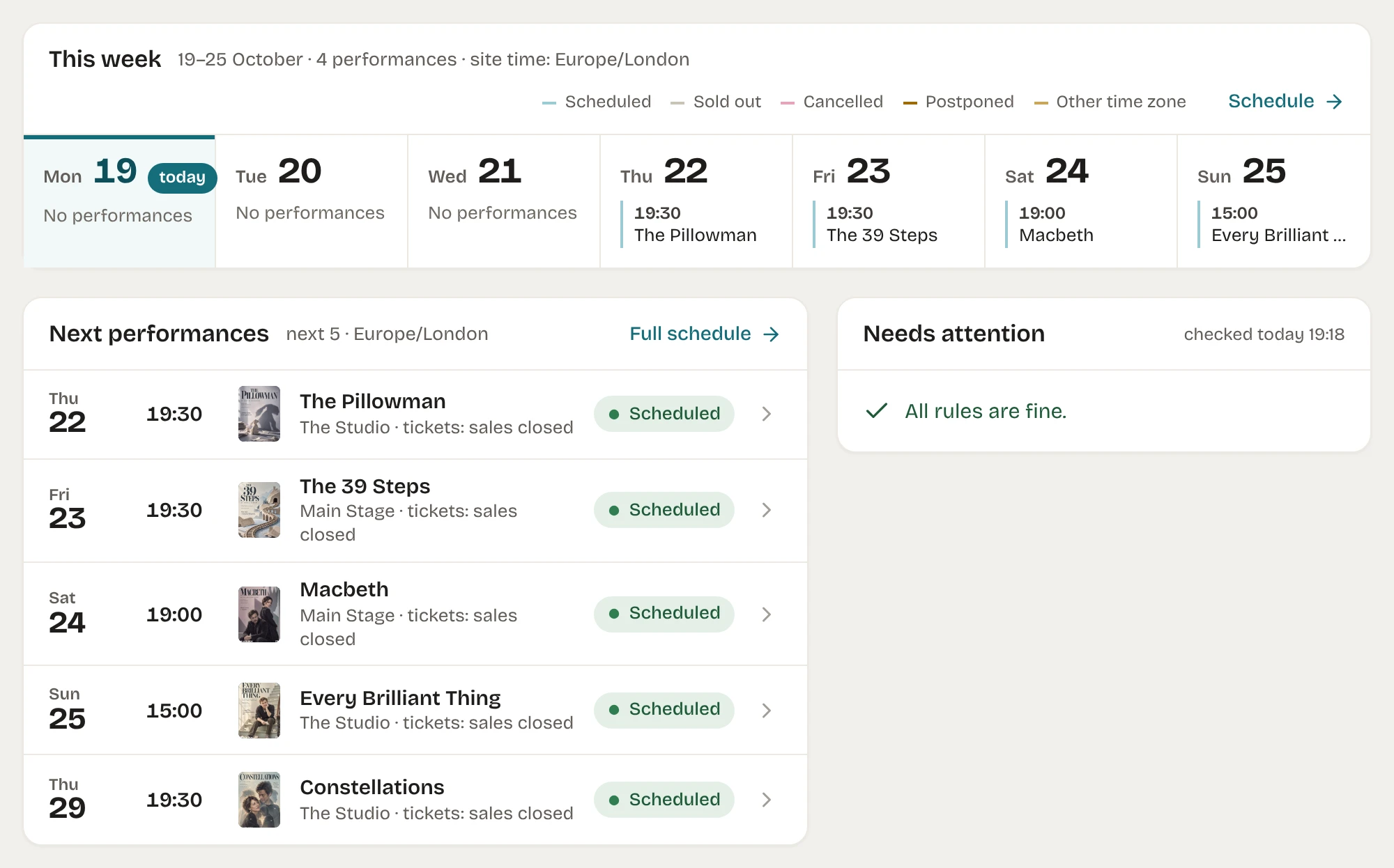
The Overview (Ülevaade) is the app's start screen. Each part is shown only to users who can act on it; nothing is stored or cached.
| Part | Content |
|---|---|
| Header | Published counts of productions, people and venues; create actions allowed for the user. |
| This week | The current week from the site's first day of the week; each day lists its performances (site time zone) and links to the Schedule for that day. |
| Next performances | The next five performances with status, venue and a ticket hint. |
| Needs attention | Three checks: a Playing production without future performances; a published production without a poster image (archived productions excluded); a performance in the next 30 days without a ticket offer. Reminders can be hidden per browser. |
| Productions | In the repertoire and Recently changed productions you can edit. |
| Getting started | Steps detected from saved data (time zone, first production, credits, venue, performance, appearance, a published production). Opening a step never creates anything. |
What stays in WordPress
- The productions list shows at most the 500 most recently changed productions; bulk actions, Trash and Quick Edit for productions are in the WordPress list (Open the WordPress list under the app's list).
- Author, comments and revisions are edited in the WordPress editor.
- Public pages are not previewed with unsaved changes; Preview and Saved page links show saved data.
- System Status: Settings → Advanced (Täpsem) shows the same facts in the app; Continue in WordPress: System status opens the WordPress screen, which also works when the app cannot load.
The compatibility screens are described in Compatibility screens.