Hype5 Theater 0.7.0 · Beta — by invitation
Appearance studio
Appearance (Välimus) controls how productions, people and lists look on the public site: layouts, which parts are shown, section order, public filters, colours, public texts and custom CSS. Settings made here are global defaults; a production or person can override them in its own Display section. This page describes the Appearance studio of the Hype5 app (Hype5 Theater → Appearance). It requires the WordPress capability manage_options. The classic Appearance form of the same settings remains as a compatibility screen, opened with Open the WordPress Appearance screen.
Areas
| Area | Contents |
|---|---|
| Theme (Teema) | Style mode (Hype5, Hybrid, Minimal); public site colours (ten colour tokens); custom CSS. |
| Production page (Lavastuse leht) | Layout and header, sections and their order, facts, credits, gallery and media, tickets, visitor information, partners and articles, the schedule on the production page. |
| Person page (Inimese leht) | Layout and options, sections and their order, current and past productions, gallery. |
| Lists and pages (Loendid ja lehed) | Productions list, archive layout, people directory, settings for all lists, the general schedule, and Collection pages: the page that shows each collection instead of its built-in address. |
| Text (Tekst) | Public texts (labels) for the site language: headings, button texts, filter names, names of built-in content types. Empty fields use the default text. |
Each area has its own Save; switching areas keeps unsaved changes. Search finds settings by name, and Changed shows only edited settings.
Preview
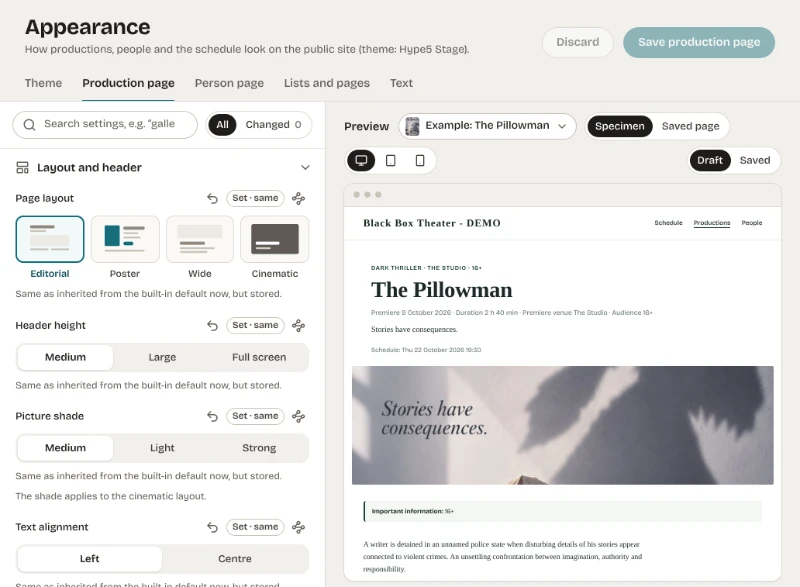
- Specimen draws the draft or the saved values with real published example content. It is a simulation, labelled as such. Password-protected and unpublished records are never used as examples.
- Saved page shows the real public page with the saved settings.
- Desktop, tablet and phone widths can be chosen.
Inheritance
Every setting shows where its value comes from:
| State | Meaning |
|---|---|
| Inherited (Päritud) | Nothing is stored; the value comes from a layout's defaults, a legacy General setting or the built-in default (named). |
| Set (Määratud) | A value is stored and differs from what would be inherited. |
| Set · same (Määratud · sama) | A value is stored and equals the inherited value; it no longer follows changes to the source. |
| Add-on value (Lisamooduli väärtus) | A stored value of an add-on that is not active. It is kept. |
Restore inheritance removes the stored value, so the setting follows its source again. The source button shows the whole chain: built-in default → layout default or General setting → global value → per-record values → shortcode attributes, with the level that wins marked.
The order of precedence on the public site is: attributes in a shortcode, then the production's or person's own Display value, then the global Appearance value, then the chosen layout's defaults, then the built-in default.
Custom CSS
Custom CSS is added to every page that shows Hype5 content, after the plugin's own styles. Changing it requires the WordPress capability edit_css (on a single site this is the same permission as unfiltered HTML; it is unavailable when DISALLOW_UNFILTERED_HTML is set, and on multisite only super admins have it). Users without it see the stylesheet read-only. The limit is 100 KB. Scope rules to .hype5 to leave the theme unchanged; see CSS and tokens.
Collection pages
Choose a published page that contains the matching shortcode ([hype5_productions], [hype5_people] or [hype5_schedule], or a legacy name). The built-in address of that collection then redirects to the page with HTTP 302, keeping filter parameters. Choosing the built-in page again (Built-in page in the app, Built-in collection on the classic screen) removes the stored choice.
Saving
A save sends only the changed settings of the current area. If any of them changed elsewhere since you opened the studio, nothing is saved and the differing settings are shown: Use the saved values or Keep mine and save.